

Your Brand. Every Document. Every Time.
LexHeader gives your entire organisation instant access to approved letterheads, document templates, headers and footers straight from the Word ribbon. No shared drives. No wrong versions. No Hassle.

Features
One-Click Letterheads
Staff select and load approved company letterheads directly inside Microsoft Word. No shared drives, no searching.


Control which teams see which templates. Litigation, HR, Finance, each department sees only what they need.
Role-Based Access
Templates are managed centrally. Update once and every user gets the latest version instantly.
Always On Brand

Document Management, Simplified.
LexHeader was built to eliminate one of the most persistent challenges in professional environments. Document inconsistency. Outdated letterheads, incorrect templates, and multiple versions circulating across departments create risk and undermine brand integrity.
LexHeader centralises all your organisation's templates, letterheads, and frequently used documents in a single, secure location. Administrators manage and update templates once. Every user across every department instantly has access to the latest approved version, automatically.
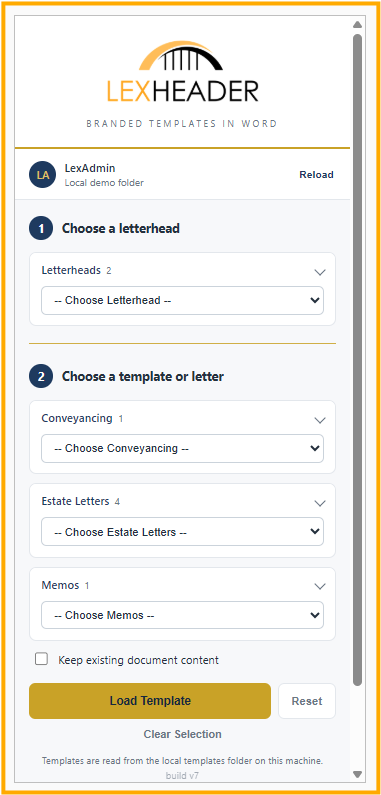
For staff, the experience is effortless. LexHeader sits directly inside Microsoft Word. Open the taskpane, select the required template, and load it. No searching shared drives. No version confusion. Just the right document, every time.
Pricing
Starting from
$499/month
Annual subscription · Custom pricing available
Every business is unique. We structure our pricing packages bespoke to your business needs. Whether you're a small practice or a large organisation, we tailor each package around your user count, workflows, and needs. Reach out and let's build the right solution for you.
Better Together
LexHeader + RexMount Bundle — $899/month $1098(Save $199/mo)
Branded templates in Word, plus your entire SharePoint library mapped as a local drive. Works great together. LexHeader keeps your documents on-brand, RexMount makes finding them instant.
https://www.rexmount.com/
Contact Us
Interested in working together? Fill out some info and we will be in touch shortly. We can’t wait to hear from you!
How it Works
Once you subscribe, our team will reach out within 1 business day to schedule an onboarding meeting.
During this session we will configure LexHeader for your organisation, set up your templates, and integrate the add-in with your Microsoft 365 environment.
The full onboarding process typically takes around 5 working days, after which we hand over a fully configured, ready-to-use system.